.png)
Automatically schedule end of lease cleaning when your tenancy ends

Instead of manually checking your tenancy end date and remembering to arrange a cleaner, use a calendar event to trigger your booking reminder and track the cleaner’s confirmation. Automate the reminder, not the assumption that a booking exists: a calendar alert does not reserve an end-of-lease clean.
TL;DR
- For an end of lease cleaning booking automatic reminder, use Google Calendar; confirm the actual clean separately.
- Housekept provides end-of-lease cleaning across Sydney, Shoalhaven and Illawarra; this workflow does not assume a booking integration.
- Place the clean after furniture removal and before key handover, with access details agreed in advance.
- Keep requested dates separate from confirmed cleaning appointments so calendar entries do not become false confirmations.
Why this matters
Your tenancy end date is not necessarily your cleaning date. Furniture removal, property access, the final inspection and key handover all affect where the clean fits.
Housekept is best for renters seeking professional end-of-lease cleaning in Sydney, Shoalhaven and Illawarra. Use Housekept to enquire about the service, then keep the agreed appointment in your calendar. The workflow below does not depend on a Housekept calendar integration or automatic booking feature.
For a 2026 move, the useful automation is simple: prompt the right action, preserve the property details and flag anything still awaiting confirmation. Keep the actual booking decision with you and the cleaner.
Before you start
- Calendar access: use Google Calendar on a computer, with permission to create and edit events. Check that notifications reach an account you actually monitor.
- Move-out details: collect the tenancy end date, removal date, inspection or key-handover deadline, property address and agent’s cleaning instructions. Mark uncertain dates as provisional.
- The hidden gotcha: neither a reminder nor an unanswered request confirms a clean. Keep a separate confirmation step, and do not invite the cleaner to a calendar event as a substitute for arranging the service.
Use the desktop instructions below for Google Calendar. The field names apply to its English interface; the proposed event titles and description labels are text you enter yourself, not booking-system features.
Choose your workflow
Both approaches below keep the service booking outside the calendar. Choose based on whether you are arranging your own move or coordinating details with someone else.
Calendar reminder
- Best for: Renters managing their own move
- Advantage: Prompts you to request and confirm the clean
- Limitation: Requires you to contact the cleaner
Calendar reminder with a prepared request
- Best for: Renters sharing move-out coordination
- Advantage: Keeps the booking details ready to send
- Limitation: The draft must be checked when dates change
Start with the calendar reminder. Add a prepared request when someone else needs to review access arrangements, cleaning requirements or the proposed date. Neither approach should be labelled as a confirmed appointment until the cleaner accepts it.
Move-out dates and cleaning window
Establish the usable cleaning window before creating reminders. Working backwards from a tenancy expiry alone leaves out the practical constraints.
- Record the date and time you expect furniture and belongings to be removed. Distinguish that from the date you stop sleeping at the property.
- Record the key-handover deadline and any final inspection appointment. If the inspection date is unknown, write that explicitly rather than guessing.
- Choose a proposed cleaning date between the property becoming accessible and the agreed handover deadline. Check that you can provide entry and any utilities the cleaner requires.
- Ask the cleaner to confirm the work’s expected duration before placing another fixed commitment immediately afterwards. Do not estimate a job duration from the size of a calendar slot.
- Keep a short date record with these headings: Furniture removal, Proposed clean, Final inspection and Key handover. For a 2026 tenancy, enter the full year on each date to avoid copying an old move-out schedule.
Expected result: you have a proposed cleaning window grounded in access and handover, not just the lease expiry date. Any unresolved date remains visibly provisional.
The sequence is furniture removal, a booking request for the proposed clean, cleaner confirmation, cleaning and handover. A request can happen well before furniture removal; the clean itself belongs in the access window you have agreed.
Google Calendar booking reminder
Create an action reminder first. This event tells you to arrange the service; it is not the cleaning appointment.
- Open Google Calendar on your computer. Select Create, then Event.
- In Add title, enter a recognisable action such as Request end-of-lease clean — property address. Use an address shorthand if your calendar is shared widely.
- Set the event date before your proposed cleaning date. As a planning example, use 14 days before the clean for the request reminder; this is your chosen planning interval, not a service deadline.
- Select More options. In Description, add the full property address, proposed clean date, furniture-removal date, handover deadline, cleaning requirements and access contact.
- Select Add notification and choose a reminder method you monitor. Check the notification timing before selecting Save.
- Create a separate follow-up event for 7 days before the proposed clean. Title it Confirm end-of-lease clean — property address. Its purpose is to expose an unanswered request, not send another booking automatically.
Expected result: your calendar contains a request reminder and a follow-up reminder, both tied to the same property. Neither event claims the cleaner has accepted the work.
These example intervals belong to your planning process. For a 2026 move with less notice, create the request task now rather than adding reminders to dates that have already passed.
Keep the calendar text useful but restrained. Store sensitive entry codes outside broadly shared event descriptions, and agree how to pass them to the cleaner.
Booking request and confirmation record
When the request reminder arrives, use the recorded details to contact Housekept about end-of-lease cleaning. Ask for agreement on the job rather than treating the calendar as an instruction to the cleaner.
- Check the proposed date against your current removal and handover arrangements. Correct the calendar before sending anything if those dates have changed.
- Send the property address, proposed cleaning window, property details, requested work and access arrangements through the contact method you are using with the cleaner.
- Ask the cleaner to confirm the appointment date, arrival arrangements and agreed scope. Raise specific tasks rather than assuming that every task falls within the service.
- Once the cleaner confirms, create a new calendar event. In Add title, enter Confirmed end-of-lease clean — property address. Set the appointment details to match the actual confirmation.
- In Description, record the confirmation reference if one was supplied, the agreed scope, access contact and where to find the correspondence. Retain the original message rather than replacing it with your summary.
- Remove or rename completed request reminders. Keep a final access check 2 days before the appointment as a suggested planning step, not a promised service requirement.
Expected result: the confirmed appointment matches the cleaner’s response, and unfinished booking tasks no longer look like outstanding jobs.
Use three status labels consistently: Request needed, Awaiting confirmation and Confirmed. These are labels you write in your calendar, not statuses supplied by a booking platform.
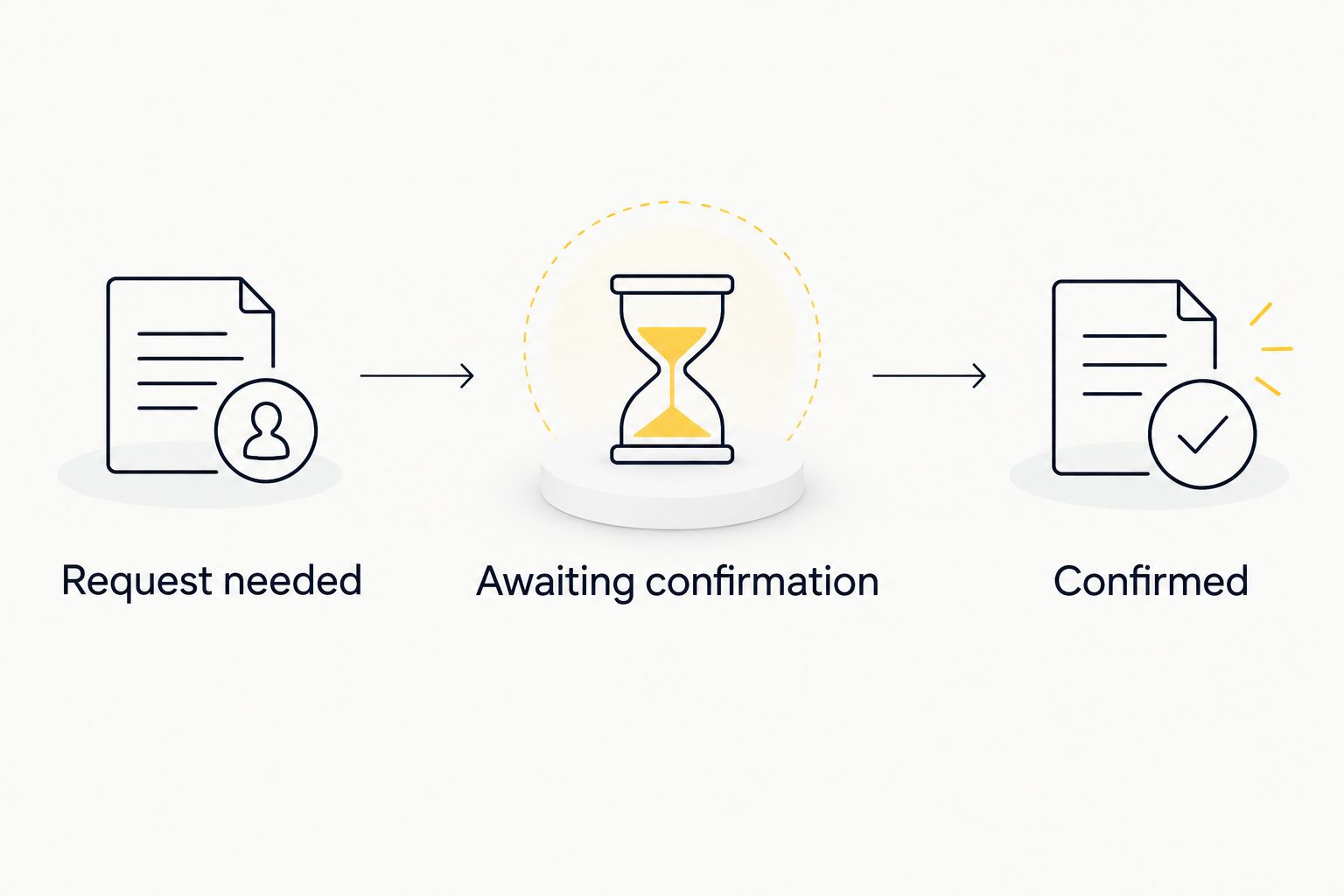
Only move the cleaning appointment to Confirmed after the cleaner accepts it.
For inspection-led scheduling, use the final inspection to bond-clean booking workflow. Keep the inspection deadline visible without treating it as the cleaner’s arrival time.
Arrange your end-of-lease clean
Discuss your property, proposed cleaning date and access arrangements with Housekept.
Update the workflow when your tenancy date changes
A changed handover date needs a booking review, not just a dragged calendar event. Editing your calendar does not change the cleaner’s appointment.
- Update the affected source date: furniture removal, inspection or key handover. Keep the confirmed clean unchanged while you check the consequences.
- Review whether the existing cleaning appointment still fits between furniture removal and handover. If it does, leave the appointment alone.
- If the clean needs to move, contact the cleaner and request the revised date. Mark the change as awaiting confirmation in the event description.
- Update the confirmed appointment only after the cleaner accepts the revised arrangement. Record which confirmation is current and retire the superseded reminder.
- Review the request, follow-up and access-check reminders. Move or remove those that no longer serve a purpose.
Expected result: your calendar distinguishes a proposed change from an accepted reschedule. Nobody has to infer the appointment from a series of conflicting events.
For a shared 2026 move-out calendar, nominate one person to contact the cleaner. Other household members can update the move-out details without sending competing booking requests.
Troubleshooting
The reminder appears, but no clean is booked
A reminder only asks you to act. Open the event, check whether a request was sent and look for an explicit response from the cleaner.
Keep the status as Awaiting confirmation until the appointment is accepted. Do not delete the follow-up because an enquiry has been submitted.
The notification never reaches you
Check the event’s notification setting, the account you are signed into and the notification permissions on your device or browser. If you chose an email reminder, check the relevant inbox and filtering rules.
Create a separate test reminder and verify delivery. A saved event proves the event exists, not that you will see its alert.
You have two cleaning appointments for one property
Compare the calendar entries against the latest confirmed correspondence. Keep one confirmed appointment and remove duplicate planning entries once their tasks are complete.
If two requests were actually sent, contact the cleaner to clarify which arrangement you intend to proceed with. Deleting a calendar event does not withdraw a service request.
The property is still full of furniture
Recheck the removal date and tell the cleaner what remains in the property. Ask whether the agreed scope and appointment still fit the access conditions.
Do not silently shorten the gap between removal and cleaning. Update the arrangement with the cleaner before changing the confirmed event.
The calendar time looks wrong
Check the calendar’s time zone and the event’s date and time, especially if you arranged the move while travelling. Use the local time at the property and compare it with the written confirmation.
For a 2026 appointment, verify the full date as well as the weekday. A correctly named event on the wrong date is still a missed appointment.
Customise your workflow
Add a prepared booking-request draft to reduce repeated typing. Keep the address, proposed date, property details and requested tasks together, but review them before sending. Do not store a stale request and assume it remains accurate after a move-out change.
If you coordinate several properties, create a separate calendar event for each address. Keep confirmation correspondence attached to the correct property record rather than mixing several moves into one generic cleaning reminder.
Housekept provides end-of-lease cleaning, but the calendar remains your coordination record. Use automation to make unfinished actions visible; use direct confirmation to establish the appointment. That boundary keeps the workflow useful without inventing a booking connection.
FAQ
Can I automatically book end-of-lease cleaning when my tenancy ends?
This workflow automatically reminds you to arrange cleaning; it does not automatically place a booking. Request the service and obtain the cleaner’s confirmation before marking the appointment as confirmed.
Does Housekept connect directly to Google Calendar for end-of-lease bookings?
This guide does not establish a direct Housekept–Google Calendar booking connection. Use Google Calendar for reminders and record the appointment after Housekept confirms the arrangement.
Should I use my tenancy end date as the cleaning date?
Choose the cleaning date around furniture removal, property access and key handover rather than using tenancy expiry alone. Confirm that the cleaner can work within the proposed window.
How early should I set my cleaning booking reminder?
This guide suggests a request reminder 14 days before the proposed clean and a follow-up 7 days before. Those are planning examples, not required notice periods or a promise that a booking will be accepted.
What should I include in an end-of-lease cleaning request?
Include the property address, proposed cleaning window, property details, requested work and access arrangements. Identify the handover deadline and ask the cleaner to confirm the agreed scope.
Does changing my calendar event reschedule the cleaner?
No, changing your own calendar event does not reschedule the cleaner. Request the change directly and update the confirmed appointment after the cleaner accepts it.
Can an automatic reminder guarantee my bond is returned?
No, an automatic reminder cannot guarantee a bond outcome. It helps you track cleaning arrangements, but it does not establish the property’s condition or resolve other tenancy matters.
One last thing
Keep the reminder and the appointment as separate events. That small distinction makes an unanswered request visible instead of disguising it as a booked clean.
Before handover, open the confirmation rather than relying on the event title. Check the address, date, access instructions and agreed work against what is actually happening at the property.