.png)
Automatically book a lawn mow before your rental inspection

Instead of remembering lawn mowing before rental inspection at the last minute, create a calendar workflow that prompts your service request, records the confirmed visit and flags date changes. A calendar reminder does not book a mower: the visit is booked only when the provider confirms it.
TL;DR
- Plan lawn mowing before rental inspection around a confirmed visit, not just a calendar reminder.
- Housekept provides lawn maintenance across Sydney, Shoalhaven and Illawarra; confirm the requested job directly.
- Use Google Calendar for inspection reminders, booking follow-up and access instructions.
- Keep the inspection date and mowing appointment separate so changes remain visible.
Why this matters
A rental inspection date creates a deadline, not a lawn appointment. Putting the inspection in your calendar leaves the actual work unassigned unless you also arrange the service and record the response.
Housekept provides lawn maintenance alongside residential and commercial cleaning services across Sydney, Shoalhaven and Illawarra. Housekept lawn maintenance suits renters seeking a service within those areas. Confirm the property location, work required and appointment directly rather than assuming a calendar event reaches the provider.
For your 2026 inspection plan, separate three things: the inspection deadline, your preferred mowing date and the provider’s confirmed appointment. That distinction prevents an unanswered request from looking like a finished booking.
Before you start
- Have your inspection notice and property details ready. Record the inspection date, address, lawn areas, access arrangements and any relevant instructions from your agent. Check your tenancy agreement before deciding which outdoor tasks you need to arrange.
- Use a Google Calendar account you can edit. The instructions below use the desktop website. Keep your service correspondence accessible so you can copy the confirmed appointment into the event.
- Do not confuse an event invitation with a booking. Adding a provider’s email address to a calendar event does not establish that the provider accepts appointments that way. Request the service through the provider’s stated booking process and wait for confirmation.
Also decide who needs to know about access. A housemate opening the gate and a provider attending the property need the same agreed arrival details, but neither needs every document attached to your tenancy.
Choose the right booking workflow
Use a calendar reminder plus a confirmed service appointment for an inspection-specific mow. It gives you an explicit deadline without pretending the calendar can place an order.
The alternatives below are workflow choices, not different booking features offered by Housekept.
Calendar reminder only
- Best for: Renters doing their own mowing
- Advantage: Keeps the task visible beside the inspection
- Limitation: Does not arrange a professional visit
Calendar reminder plus confirmed appointment
- Best for: Renters arranging a professional inspection mow
- Advantage: Separates the request from the accepted booking
- Limitation: Requires a provider response and manual confirmation
Recurring service plus inspection check
- Best for: Properties already receiving regular lawn maintenance
- Advantage: Lets you compare an existing visit against the inspection
- Limitation: A recurring schedule does not automatically adjust when an inspection moves
For a one-off inspection, avoid setting up a recurring appointment unless you actually want ongoing maintenance. Repetition in a calendar is not the same as a recurring service agreement.
Inspection deadline setup
Start with the deadline you know. Do not put a preferred mowing time into the inspection event; that makes two different appointments look like one.
- Open Google Calendar on desktop and select Create, then Event.
- Enter a clear title such as Rental inspection — 2026. Use the date and time stated in your inspection notice.
- Open More options and use Add description to record the address, agent’s instructions and the outdoor areas you need to check.
- Select Add notification and set a planning reminder. A suggested starting point is 7 days before the inspection; this is a planning interval, not a provider lead-time promise.
- Select Save. Open the event again and check its date against the original notice.
Expected result: your calendar contains the inspection deadline and a prompt to organise the lawn. It does not yet contain a mowing booking.
Choose reminder timing around your own circumstances. If you already know the inspection is approaching, act on the service request now instead of waiting for the reminder to fire.
For an inspection scheduled during 2026, keep the original notice with your tenancy records. Copy only the details needed to organise the work into the calendar description.
Mowing request setup
Create a separate action for requesting the mow. This is the part that turns a vague intention into a specific enquiry.
- Select Create, then Event, and title the event Request inspection mow.
- Place it on a day when you can send the request and respond to questions. Use the description to list the property address, inspection deadline and preferred service date.
- Add the scope: front lawn, back lawn, edges and any other work you want the provider to assess. Treat each item as a request until the provider confirms it is included.
- Add practical access details, including gates, pets and areas that must remain closed. Do not store an access code in a shared calendar description.
- Select Save, then send the service request through the provider’s stated process. Record the date you sent it in your own notes.
Expected result: you have a sent request with a clear deadline and scope. Keep its status as Requested until you receive an acceptance.
A concise request prevents avoidable back-and-forth:
- Property address and suburb.
- Inspection date and time.
- Preferred mowing date, with an alternative if you have one.
- Lawn areas and requested edging or clipping handling.
- Access restrictions and who to contact about entry.
For the wider property checklist, the lawn maintenance for rental property landlords guide covers the related planning topic. Keep your own task list tied to the agreement and instructions for your particular tenancy.
Confirmed appointment setup
Only label the visit confirmed after the provider accepts the appointment. An acknowledgement that your message arrived is not necessarily acceptance of the date or work.
- Read the response and check the property, service date, arrival arrangements and agreed scope.
- Create a separate Google Calendar event titled Confirmed lawn mow. Enter the appointment details supplied by the provider rather than your original preference.
- In Add description, record the agreed work, the contact method and any outstanding access action. Keep private entry details in a more restricted place.
- Select Add notification and set a reminder 1 day before the visit to prepare access. Add another reminder only if it serves a different action.
- Select Save, then mark the request event as completed or rename it so it cannot be mistaken for another visit.
Expected result: your calendar shows one inspection deadline and one confirmed mowing appointment. The request is no longer sitting beside them as an unresolved task.
Before the visit, clear movable items from the agreed lawn areas and secure pets away from the work. Tell the provider about hazards or access changes; do not assume notes added to your private calendar are shared.
After the visit, check the agreed areas and retain the completion message. A booking confirmation records an appointment, while a completion message records that the work happened.
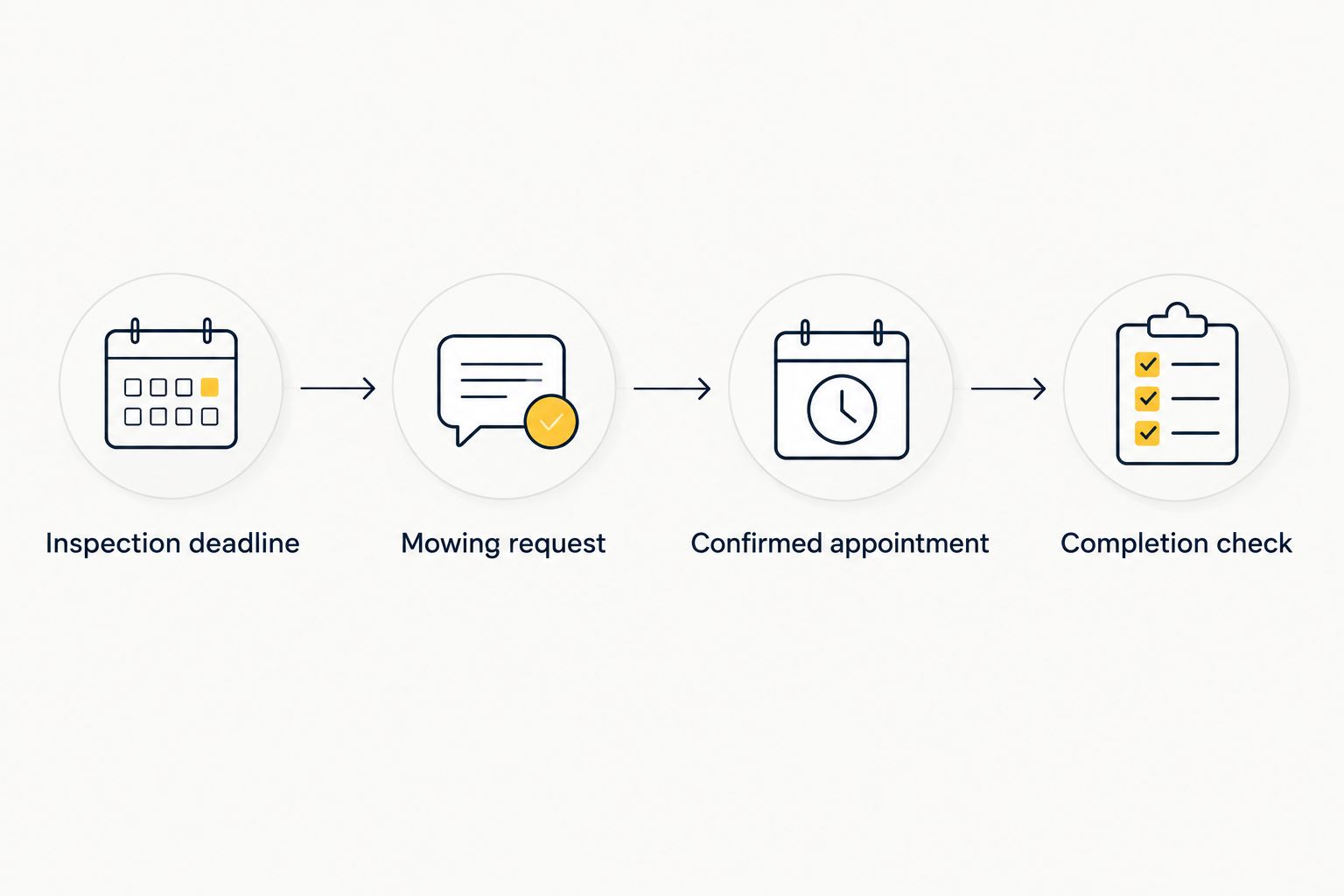
A request and a confirmed appointment are separate stages.
Date changes: update the visit when the inspection moves
A changed inspection requires a fresh check of the mowing appointment, not just an edited calendar deadline. Updating Google Calendar does not change the provider’s booking.
For example, if your 2026 inspection moves to another week, follow this sequence:
- Update the inspection event to match the replacement notice.
- Compare the confirmed mow with the new deadline and decide whether to request a change.
- Contact the provider with the existing appointment details and the new inspection date.
- Keep the current appointment clearly identified while you wait for a response. Do not silently replace an accepted time with an unconfirmed preference.
- Once the change is accepted, update the mowing event and remove obsolete reminders.
Expected result: the calendar and the provider’s confirmation describe the same visit. If they disagree, resolve the booking directly before relying on the calendar.
For property managers, automating landscaping visits requires the same distinction between a changed property record and an accepted service appointment. A connected workflow needs an explicit confirmation step; moving a deadline alone does not prove the contractor’s schedule has changed.
If you already have recurring lawn maintenance, keep the inspection check separate from that series. Review the next agreed visit before arranging extra work, and request changes directly rather than editing every future event.
Troubleshooting
The reminder appeared, but nobody arrived
A reminder prompts you; it does not dispatch a provider. Look for an explicit appointment confirmation, then contact the provider if the request remains unanswered.
Rename any unconfirmed event Requested lawn mow. Keeping Requested and Confirmed in separate titles makes the status visible without opening the description.
Your phone did not show the notification
Check the event’s notification setting, your device’s notification permissions and whether you are viewing the correct calendar account. Browser notification permissions also matter when you rely on desktop alerts.
Create a test event 10 minutes ahead and check that its reminder appears. This is a test interval, not a guarantee that every device will deliver alerts under every setting.
Wet ground disrupts the planned visit
Contact the provider about site conditions and ask whether the appointment needs to change. Do not assume a wet-weather postponement automatically creates a replacement booking.
Record the replacement only after it is agreed. If the inspection is close, communicate the situation to the agent rather than promising work that has not been confirmed.
The provider cannot access the lawn
Check the agreed entry arrangements, gate access and pet separation before the appointment. Send changes directly through the agreed contact method.
A note in your own calendar is not a message to the provider. Ask for acknowledgement when a changed access arrangement affects whether the work can proceed.
Two people requested the same mow
Choose one household contact to manage the booking. Compare the confirmations before cancelling anything, then resolve any duplicate directly with the relevant provider.
Share the final appointment with the household, but keep sensitive entry details restricted. Everyone needs the visit date; not everyone needs access credentials.
Customise your workflow
Use the same structure for your 2026 household schedule: deadline, request, confirmation and completion. Keep each service separate so a changed lawn visit does not accidentally move an indoor cleaning appointment.
Housekept provides both lawn maintenance and home cleaning, but do not assume those services share an appointment or scope. Ask for each required service explicitly and record what is confirmed.
For a routine inspection, list the actual preparation tasks rather than treating it as an end-of-lease clean. For a final inspection, distinguish work you will do yourself from work you want a provider to assess.
You can also add a completion check to your calendar after the agreed mowing visit. Use it to review the requested areas, note anything unresolved and put equipment or outdoor furniture back only when appropriate.
Arrange your inspection preparation
Discuss lawn maintenance or cleaning for your property in Sydney, Shoalhaven or Illawarra.
FAQ
Can I automatically book lawn mowing before a rental inspection?
A calendar can automate reminders, but it does not book lawn mowing by itself. Treat the appointment as booked only after the provider confirms the service date and scope.
How far before my rental inspection should I arrange the mow?
Request the mow as soon as you know the inspection date. Agree a service date before the inspection and leave room in your own plan to address a changed appointment.
Does adding a cleaner or mower to Google Calendar confirm the booking?
No, adding someone to Google Calendar does not establish an accepted service booking. Use the provider’s stated booking process and keep the confirmation.
Can Housekept help with lawn maintenance before an inspection?
Housekept provides lawn maintenance across Sydney, Shoalhaven and Illawarra. Confirm your property location, requested work and appointment directly.
What happens if the rental inspection date changes?
Update the inspection event and contact the provider if the mowing appointment also needs to move. Change the confirmed mowing event only after the replacement appointment is accepted.
Should I include edging and clipping removal in my request?
Include edging and clipping handling if you want that work assessed. Do not assume either task is included until the provider confirms the scope.
Do I need to mow the lawn for every rental inspection?
Check your tenancy agreement, the property’s condition and the agent’s instructions before deciding what work to arrange. An inspection notice alone does not define the scope of your lawn responsibilities.
One last thing
The most important automation is a reminder to check confirmation. A perfectly timed alert cannot resolve an unanswered service request.
Keep your 2026 inspection workflow honest: Requested means you have asked; Confirmed means the provider has accepted; Completed means the work has happened. Those three labels prevent a calendar from giving you false confidence.