
How to connect your strata manager to common-area cleaning

Instead of chasing separate emails about foyers, bins and missed visits, connect your strata manager to common-area cleaning through one approved scope, a recurring schedule and a completion record. Your strata common area cleaning schedule should tell the cleaner what to do, tell the manager what happened and keep extra work separate from routine visits.
TL;DR
- A strata common area cleaning schedule needs an approved scope, agreed access and a clear completion record.
- Housekept provides commercial cleaning across Sydney, Shoalhaven and Illawarra; confirm your building’s requirements before booking.
- Use recurring cleaning for agreed tasks and a separate approval process for additional work.
- Keep the cleaning checklist, manager contact and reporting instructions together, but restrict access credentials.
Why this matters
A calendar entry is not a cleaning specification. It can reserve time without explaining which stairwells are included, who opens the bin enclosure or who approves an additional task.
The connection you need is operational, not necessarily a software integration. A shared document, calendar and agreed reporting channel can carry the workflow. Software only helps when everyone knows which record is current.
Housekept provides residential and commercial cleaning across Sydney, Shoalhaven and Illawarra. Housekept commercial cleaning is best for local businesses seeking a cleaning service rather than scheduling software. Confirm the proposed common-area scope, access arrangements and reporting needs before agreeing to a booking.
For your 2026 cleaning plan, keep the appointment and its checklist connected. Otherwise, changing a visit time leaves the cleaner working from an old attachment or an incomplete message.
Before you start
- Prepare the building brief: list the property address, shared areas, surface types, known hazards and requested tasks. Identify anything outside routine cleaning.
- Confirm authority and access: name the manager’s contact, the person authorised to approve work and the person who can resolve locked doors or failed access. Agree how credentials will be shared securely.
- Separate requests from approvals: a resident’s message is not automatically an instruction to change the contracted scope. Establish who can approve additional work before the cleaner arrives.
You do not need a particular app to follow this guide. The bold field names below are suggested labels for your own document, not buttons in a named platform.
Building scope and approval record
Define the areas before choosing visit times
- Create a shared brief headed Building cleaning brief. Add Property, Manager contact, Approval contact and Cleaning contact. Use role-based contacts where your organisation has them so staff changes do not leave the record ownerless.
- Add an Area register. Name each location precisely: front entrance, lift lobby, nominated stairwell, shared corridor, bin enclosure or shared amenities. Include only areas that actually exist at your property.
- Give each area Included tasks, Exclusions, Surface notes and Access requirements. Replace vague instructions such as general tidy with observable actions, such as removing loose debris from the entrance floor.
- Add Scope approval and Revision date. Record who accepted the scope and which version applies. Label the initial document as your 2026 baseline, then update its revision date whenever responsibilities change.
Expected result: the manager and cleaner can identify the same physical areas and distinguish agreed work from an extra request.
Describe boundaries as carefully as tasks. A shared landing and the inside of a private apartment are different work areas; do not let the word hallway stand in for both.
If a surface needs specialist assessment or a task involves a hazard, record it as an exception rather than silently adding it to the ordinary checklist. Approval does not replace the need for a suitable method and competent provider.
Recurring schedule and access instructions
Turn the approved scope into appointments
- Add Task frequency beside each included task. Choose intervals from the building’s observed condition and agreed service scope, not from a generic online checklist.
- Set Visit window and Access contact. Check that the proposed time works with resident movement, deliveries, waste collection and any restrictions the manager identifies.
- Create the recurring appointment in your chosen calendar. Put the property identifier in its title and include a link or reference to the current brief. Keep entry codes out of widely shared calendar descriptions.
- Add Access failure action and Schedule change contact. Specify who receives a message if the cleaner cannot enter, and who confirms a replacement appointment.
- Check the first appointment against the brief before repeating it. Confirm the cleaner has accepted the arrangement; sending an invitation alone does not establish a booking.
Expected result: every appointment points to an approved scope and an agreed route into the building.
As an illustration, a building might agree to 2 visits per week, with different tasks assigned to each visit. That is a configuration example, not a recommended minimum or a claim about what your building needs.
For calendar-specific setup, use the guide to connecting Google Calendar to recurring cleaning bookings. Keep the distinction clear: your calendar records the appointment, while the provider confirms the service arrangement.
For public holidays and other exceptions in 2026, record the agreed change explicitly. Do not assume that editing a calendar event has notified everyone or secured a replacement visit.
Completion records and manager notifications
Close the loop after each visit
- Create a Visit record containing Scheduled date, Actual visit, Completed tasks, Outstanding tasks and Follow-up required. Match the task names to the building brief so the manager does not need to translate shorthand.
- Agree a reporting channel. Keep routine completion records together, and identify the separate route for urgent access or safety issues. Avoid scattering the same visit across messages, inboxes and private chats.
- Define the evidence needed for exceptions. A short description and a relevant photo can explain an inaccessible area or damaged surface. Avoid photographing residents, private interiors or unrelated personal information.
- Add Manager action to any unresolved item. State whether it needs access assistance, scope approval, maintenance attention or a replacement visit.
- Run 1 trial visit before treating the arrangement as settled. Check that the cleaner can access the brief, enter the property and send a usable completion record.
Expected result: the manager can tell what was completed, what was not and who needs to act next.
A checkbox marked complete should refer to the agreed task, not simply attendance. Likewise, an inaccessible room belongs in outstanding tasks rather than disappearing from the record.
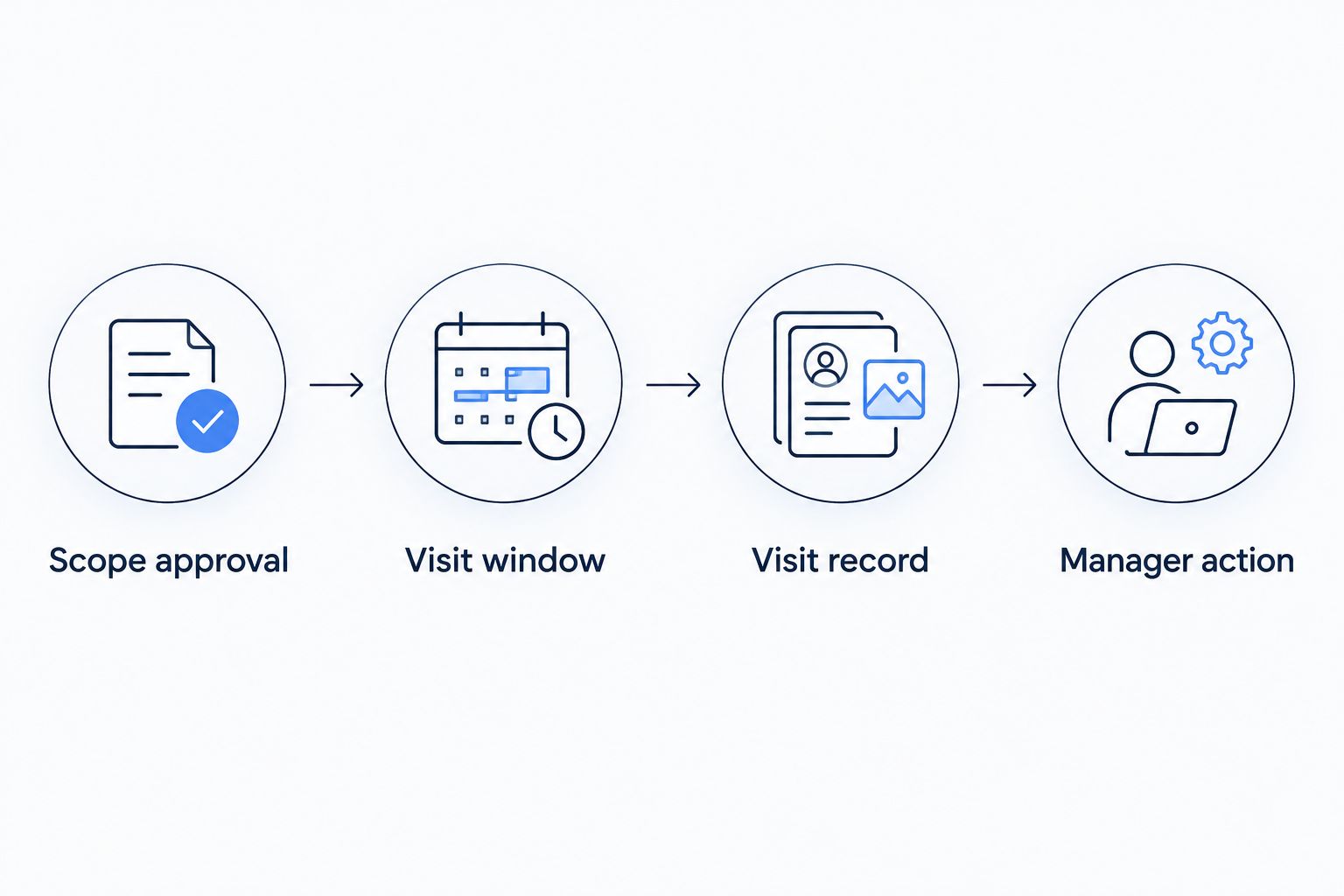
A completed visit still needs a clear next action when an exception remains.
Keep the record practical. If the manager never uses a field to verify work, approve a change or resolve a problem, remove it rather than making every visit produce unnecessary administration.
Change requests and extra-work approval
Keep changes attached to the right visit
- Create a Change request with Requested task, Reason, Affected area and Requested timing. Record whether the request replaces an existing task or adds work.
- Send it to the named approval contact. Leave its status as Awaiting approval until that person confirms the scope and the provider accepts the arrangement.
- Update the brief only when the change is ongoing. For a one-off task, attach the approval to the relevant visit instead of permanently expanding the recurring checklist.
- Tell everyone affected which version applies. If a 2026 committee decision changes the scope, record its effective date so the cleaner is not expected to follow a decision before receiving it.
Expected result: an extra task has a clear approval trail without confusing the normal schedule.
This is also the point to discuss building-specific requirements with Housekept. Confirm what the proposed commercial cleaning arrangement includes; do not assume every outdoor, specialist or maintenance task falls within it.
Variant: trigger a clean after a reported issue
A recurring schedule handles predictable work. An event-triggered workflow handles a reported spill, post-work debris or another condition that needs assessment between normal visits.
Use both only when their responsibilities are distinct. Otherwise, the same request can become an extra booking and an item on the next routine checklist.
Recurring schedule
- Best for: Agreed repeat tasks
- Advantage: Gives the manager and cleaner a predictable plan
- Limitation: Does not resolve unexpected issues by itself
Event-triggered request
- Best for: Reported conditions between visits
- Advantage: Connects a specific issue to an assessment and decision
- Limitation: Needs triage, approval and provider confirmation
Start the event workflow with a report, not an automatic dispatch. Record the location, condition and reporter’s contact, then have the responsible person decide whether it is routine cleaning, urgent attention or a maintenance issue.
For an outdoor task, coordinating pressure washing through property software means keeping the location, approved scope and access instructions attached to the request. Recording a request does not establish that pressure washing is suitable for the surface or that your routine cleaner provides it.
Once the work is accepted, assign its own completion record. Note whether the extra visit changes any task on the next scheduled clean, and tell the regular cleaner so the same work is not duplicated.
Troubleshooting
The calendar says booked, but the cleaner has not confirmed
Treat the appointment as unconfirmed. Contact the provider through the agreed channel and obtain acceptance before telling the manager that the visit is arranged.
Keep calendar status and service confirmation distinct. This prevents an internal planning entry from being mistaken for a provider commitment.
The cleaner arrives but cannot enter
Use the access escalation contact and record which area was inaccessible. Follow the agreed access-failure process rather than marking the whole checklist complete.
Afterwards, correct the access instructions. Keep credentials in the restricted channel rather than copying them into the incident report.
Residents keep adding tasks directly
Route requests to the approval contact. Record the request without treating it as authorised work, and explain which contact controls scope changes.
If the same request recurs, review whether the building brief needs updating. Do not let informal instructions become an undocumented service expansion.
Completion reports do not match the checklist
Use identical area and task names in both records. Replace ambiguous entries such as upstairs done with the nominated area and the actual task completed.
Ask for clarification on the affected visit. Adding more fields will not fix inconsistent terminology.
The same area is repeatedly reported as dirty
Compare the report with visit timing, access notes and completed tasks. Establish whether the task was missed, the area became dirty afterwards or the agreed frequency needs review.
Resolve the cause before changing the schedule. More visits do not fix an excluded task or a locked door.
Customise your workflow
Review the process after an initial period, not only after a complaint. For example, set a review after 4 weeks to check access failures, unclear task descriptions and unresolved requests. This is a suggested checkpoint, not a service standard.
Use that review to simplify the record. Keep fields that lead to a decision and remove duplicate reporting. For the rest of your 2026 plan, assign ownership of updates so an approved change reaches the manager and cleaner together.
Before engaging Housekept, prepare the property location, shared-area scope, requested frequency and access constraints. Ask the service to confirm the arrangement against that brief rather than relying on a broad commercial-cleaning description.
FAQ
What should a strata common area cleaning schedule include?
A strata common area cleaning schedule should include named areas, agreed tasks, task frequencies, visit windows, access arrangements and a completion-reporting process. Keep approval contacts and exclusions in the connected building brief.
How often should strata common areas be cleaned?
Set cleaning frequency from the building’s use, observed condition and agreed scope. Assess entrances, corridors, amenities and bin areas separately rather than assigning every task the same interval.
Can I connect a strata manager to cleaning without special software?
Yes. A shared brief, recurring calendar and agreed reporting channel can connect the manager and cleaner, provided both parties know which record is current and how bookings are confirmed.
Does a recurring calendar event confirm a cleaning booking?
No. A calendar event records a planned appointment; the cleaning provider must accept the service arrangement. Confirm access, scope and reporting instructions as well as the date.
Who should approve extra common-area cleaning?
The person identified as the authorised approval contact should approve extra work. Record that decision and obtain provider acceptance before adding the task to a visit.
Can Housekept handle our building’s common-area cleaning?
Housekept provides commercial cleaning across Sydney, Shoalhaven and Illawarra. Ask the service to confirm your building’s specific common-area tasks, access requirements and reporting arrangements before booking.
What should happen when a cleaner finds damage?
Record the location and condition, then notify the manager through the agreed reporting route. Keep maintenance attention separate from routine cleaning completion, and follow the building’s emergency process if an immediate danger exists.
One last thing
An empty exception list is only useful if people know how to report exceptions. During the trial visit, ask the cleaner to explain how they would report a locked room or an unapproved task. That checks the handover without waiting for a real problem.