.png)
Holiday rental platforms to guest-ready turnovers: 2026 workflow

Instead of manually retyping every departure into cleaner messages, set up holiday rental turnover cleaning around a shared job register that carries each booking through access confirmation, cleaning and final inspection. This 2026 workflow connects reservation information to a guest-ready handover without assuming your booking platform has a cleaning integration.
TL;DR
- Housekept suits holiday rental hosts seeking professional cleaning across Sydney, Shoalhaven and Illawarra.
- Build holiday rental turnover cleaning around one job per departure, not separate messages for each booking platform.
- Keep checkout and next check-in visible together; a cleaning date alone does not define the working window.
- Mark Airbnb cleaning complete separately from guest-ready approval so unresolved access, linen or maintenance issues stay visible.
Why this matters
A reservation tells you when a guest leaves. It does not confirm that someone can enter the property, reset the beds or finish before the next arrival. Treat the reservation as the trigger, not the cleaning instruction.
Housekept provides holiday rental cleaning across Sydney, Shoalhaven and Illawarra. Use the workflow below to organise the handover; confirm the cleaning scope and communication arrangements directly rather than assuming a booking feed reaches the service team.
For your 2026 operating procedure, keep booking details, cleaning instructions and completion evidence connected. A calendar entry alone cannot carry the whole handover.
Before you start
- Get the right access: You need permission to view reservations, checkout times, next arrivals and booking changes. Nominate someone who can confirm cleaning arrangements and resolve access problems.
- Prepare the property brief: Record the address, agreed cleaning scope, linen arrangements, approved access method and escalation contact. Keep keys and access codes in an appropriately restricted location, not a widely shared calendar description.
- Check the calendar gotcha: An imported calendar event is not a confirmed cleaning appointment. Check what information your platform actually provides, how updates reach you and who acknowledges each job before relying on the workflow.
This guide uses a spreadsheet or shared task list as the job register. The bold labels below are fields and statuses you create, not menu names from a booking platform or a claimed Housekept integration.
Reservation source and turnover register
Start with a register that someone can understand without searching a message history. Its purpose is to turn a reservation into an actionable cleaning job, with an identifiable owner and a defined working window.
- Create a register called Turnover register. Give the person coordinating cleaning permission to update it, and limit other access to what each person needs.
- Add Property, Reservation reference, Checkout, Next check-in, Cleaning scope, Access confirmed, Assigned contact, Status and Completion evidence.
- Create 1 job per departure. Use the property and reservation reference together to distinguish bookings; do not create another job just because the same reservation appears in another calendar.
- Record 2 timestamps per job: the outgoing checkout and the next confirmed check-in. Include the local date and time. If the next arrival is unknown, record that explicitly rather than inventing a deadline.
- Assign someone to check new reservations and changes. If you use an existing connection, verify its output against the source booking before treating it as authoritative.
Expected result: Every departure has a traceable job, and every job shows the available cleaning window. An unconfirmed arrival time remains visible as a question to resolve, not an empty cell someone overlooks.
Keep cancelled reservations identifiable until you have checked whether a turnover is still required. Deleting the booking record immediately can hide the reason a cleaning job changed.
Cleaning scope and access instructions
A cleaning job needs more than an address. Give the assigned team a property brief that separates standard tasks from requests requiring confirmation.
- Write the agreed Cleaning scope in plain language. Identify the rooms and surfaces to clean, the bed reset required and any property-specific instructions. Confirm which tasks the cleaner has accepted.
- Add a Linen plan stating where clean linen is kept, where used linen goes and who handles laundering. Do not assume linen supply or laundry is included in a cleaning booking.
- Set Access confirmed only after the responsible person verifies the entry method. Provide the approved route to the current access instructions without copying sensitive details into every booking message.
- Add Exceptions for issues such as a damaged appliance, a locked cupboard or a stain requiring assessment. Give each unresolved issue an owner.
- Send the job details through the agreed communication channel and request acknowledgement. Set Status to Confirmed only when the assigned contact has accepted the job and its timing.
Expected result: The cleaner has an agreed scope, a usable access method and clear responsibility for linen and exceptions. A sent message is not mistaken for acceptance.
For your 2026 property brief, remove instructions that no longer match the property. An outdated key location is more damaging than a short checklist.
Turnover execution and inspection
Separate doing the clean from approving the property for guests. This keeps a finished cleaning task from concealing an unresolved maintenance or access problem.
- Set Status to In progress when the assigned team confirms work has started. Record any access delay against the job rather than leaving it in a private message.
- Follow the agreed room-by-room checklist. Record exceptions as they appear, including missing linen, damage or a task outside the confirmed scope. Do not silently add work and assume someone has accepted it.
- Attach Completion evidence suited to the job: checklist confirmation, relevant photographs or written notes. Avoid photographing guest documents, personal belongings or access codes.
- Run 3 release checks: Cleaning complete, Reset complete and Access ready. Check these against the agreed property brief, not a generic assumption about what a turnover includes.
- Set Status to Guest-ready only after the nominated person resolves or formally accepts outstanding issues. Otherwise use Blocked and name the person responsible for the next action.
Expected result: Guest-ready means the agreed cleaning and reset checks have passed, and the entry arrangements are confirmed. It does not mean the cleaner merely reported leaving the property.
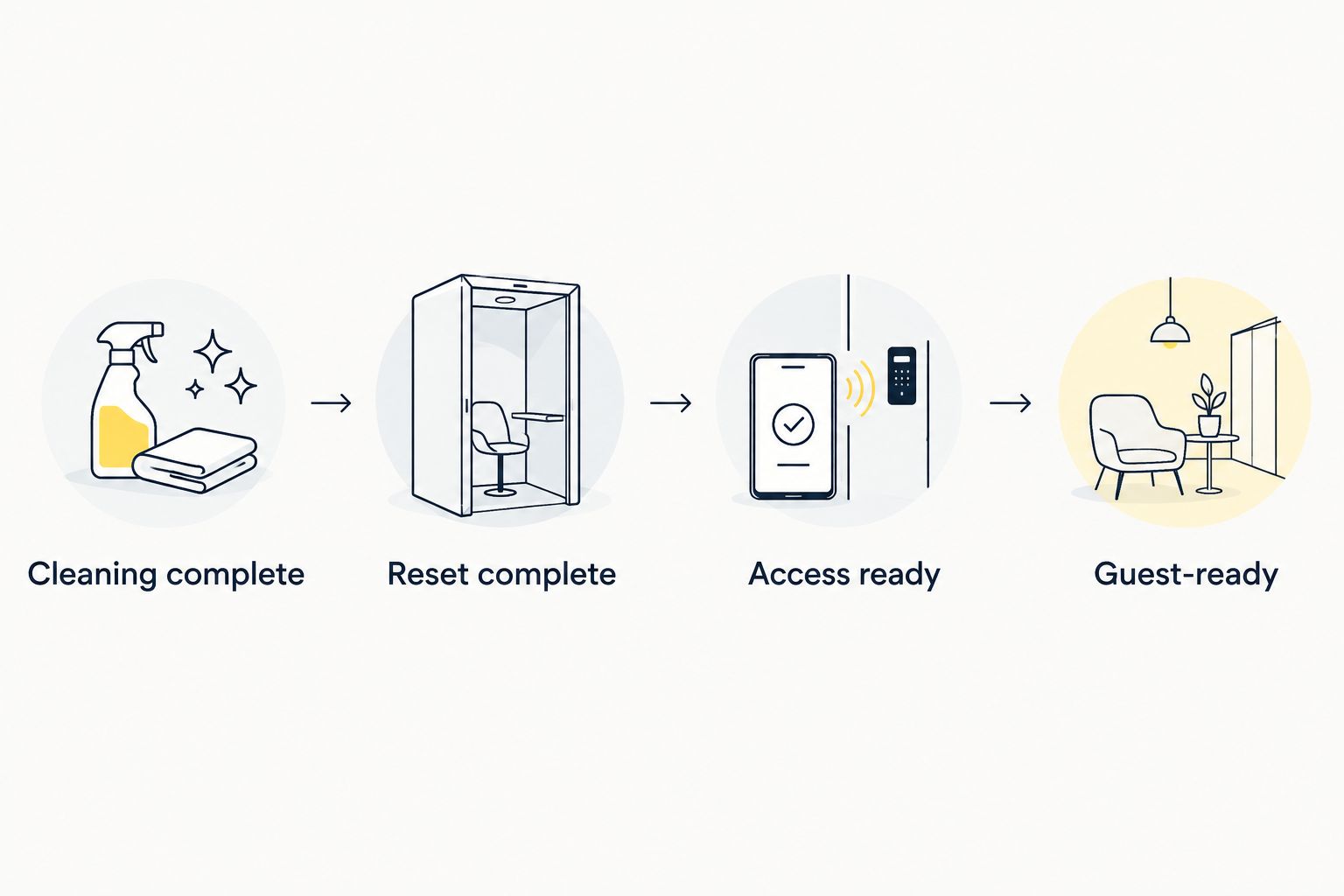
Approve the handover only after cleaning, reset and access checks are complete.
Booking changes and job ownership
A workflow needs a clear update rule as well as a clear start. For your 2026 procedure, make the person checking reservation changes responsible for getting those changes acknowledged.
- Add Last checked and Change notes to the register. Record when someone compared the job with the current reservation details and what changed.
- Check the booking source again before the scheduled turnover. Compare the checkout, next check-in and cancellation status with the register.
- Update the existing job when a reservation changes. Keep the same reservation reference so the team can see that this is a revision, not an additional clean.
- Send a focused change message containing the property, reservation reference, changed instruction and action required. Ask the assigned contact to acknowledge any change affecting the working window or scope.
- Keep Status as Awaiting confirmation until the revised arrangement is accepted. Escalate an unworkable gap to the property manager or host before promising the next guest an arrival arrangement.
Expected result: The register and the assigned team agree on the latest instructions. Updating a spreadsheet does not silently change a cleaner's accepted booking.
A second workflow: update an existing turnover
Use a departure-triggered job for a new reservation. Use an update workflow when an existing reservation changes; creating another job would split the instructions.
New departure job
- Best for: A reservation without a turnover job
- Main benefit: Establishes ownership, scope and timing
- Main limitation: Requires confirmation before becoming a cleaning appointment
Existing job update
- Best for: Changed dates, checkout times or guest requirements
- Main benefit: Keeps the revision attached to the original job
- Main limitation: Requires renewed acknowledgement when accepted arrangements change
For example, a later checkout changes the working window even if the cleaning date stays the same. Update Checkout, recalculate the gap before Next check-in, and ask the assigned contact to confirm the revised timing.
A cancellation needs a decision, not an automatic deletion. Check whether the guest occupied the property and whether cleaning is still required, then record the outcome. Cancel the cleaning arrangement explicitly when it is no longer needed.
Housekept provides holiday rental cleaning services; this guide does not establish a platform connection or automated dispatch service. Confirm how reservation changes should reach the service team before adopting either workflow.
Troubleshooting
The same departure appears twice
Compare the property and reservation reference before assigning work. Keep the accepted job as the active record and mark the duplicate clearly; do not remove it until you have checked that nobody accepted a separate appointment.
A changed checkout has not reached the cleaner
Update the job and contact the assigned person through the agreed channel. Request acknowledgement of the new time. A revised calendar event or register entry is not proof that the cleaner has seen it.
The cleaner cannot enter the property
Keep the job Blocked and contact the nominated access owner. Confirm that the instructions refer to the correct property and current entry method. Do not circulate replacement codes to a wider group than necessary.
Cleaning is complete, but the reset is unfinished
Leave Guest-ready unset. Assign the outstanding linen, restocking or maintenance task to its agreed owner, then repeat the relevant release check. Cleaning completion and property readiness are different decisions.
The next arrival leaves an unworkable cleaning window
Ask the assigned team whether the agreed scope fits the revised window. If it does not, escalate the scheduling conflict to the host or manager. Do not solve a time conflict by quietly removing cleaning tasks.
Customise your workflow
Keep one core checklist, then add property-specific instructions. A compact unit and a larger holiday home need their own room list, linen plan and access brief; copying the same unchecked template creates ambiguity.
For a detailed departure handover, use the Airbnb checkout-to-turnover cleaning workflow. Keep the same reservation reference across your booking record, cleaning job and issue notes so changes remain traceable.
Best for local service coordination: Housekept suits hosts arranging professional holiday rental cleaning across Sydney, Shoalhaven and Illawarra. Confirm the property scope and handover process directly. Cleaning support does not remove your responsibility to keep reservation details current and approve unresolved property issues.
Add recurring property care as a separate task rather than hiding it inside every turnover. An appliance issue or a larger maintenance job needs its own decision, owner and completion check.
Arrange your holiday rental cleaning
Discuss your property, cleaning scope and turnover handover with Housekept.
FAQ
What's the simplest holiday rental turnover cleaning workflow?
Create one job per departure, confirm the cleaning scope and access, then approve the property after cleaning, reset and entry checks. Keep booking changes attached to the same job.
Does a synced booking calendar automatically book a cleaner?
No: a calendar entry alone is not an accepted cleaning appointment. Confirm what your connection sends and require acknowledgement from the assigned cleaning contact.
Can I use this workflow for Airbnb and other holiday rental platforms?
Yes, the shared-register workflow is platform-independent because you record the reservation details yourself. Check each platform's actual calendar and integration features before adding automation.
What should I do when a guest checks out later?
Update the existing job and get the revised timing acknowledged by the assigned cleaning contact. Check whether the remaining window still supports the agreed cleaning scope before confirming arrival arrangements.
Does holiday rental cleaning automatically include linen and restocking?
Do not assume linen handling or restocking is included. Confirm those tasks, supplies and responsibilities when agreeing the property brief.
Who should mark a holiday rental guest-ready?
The nominated person responsible for the handover should mark the property guest-ready after the agreed checks pass. A cleaning completion message alone does not resolve maintenance, missing linen or entry problems.
Where does Housekept provide holiday rental cleaning?
Housekept provides holiday rental cleaning across Sydney, Shoalhaven and Illawarra. Confirm the arrangements for your property directly, including scope, access and communication.
One last thing
Test a booking change, not just a new booking. Before relying on your 2026 workflow, use a clearly labelled practice record to change a checkout time and follow the update through to acknowledgement. Do not send the practice record as a real cleaning request.
A workflow that creates jobs but fails to revise them leaves the team working from yesterday's instructions. Keep the update test in your operating procedure whenever you change platforms, contacts or communication methods.